Skip to Content
My Website
  • Home
  • Services
  • About Us
  • Helpdesk
  • Jobs
  • Contact us
  • +251 9 83 58 58 58
  • Sign in
  • Contact Us
My Website
      • Home
      • Services
      • About Us
      • Helpdesk
      • Jobs
      • Contact us
    • +251 9 83 58 58 58
    • Sign in
    • Contact Us
    Home Page
    System Users Managment
    Applications
    Manufacturing
    Configuration_manu
    Settings_manu
    Bill of Materials Types
    Routing
    Work Center Categories
    Resources & Quality
    Work Centers
    Bill of Materials
    Quality Control
    Maintenance
    Dashboard_Manu
    Overview
    Reports_manu
    Statistics_manu
    Production
    Work Order
    Production Orders
    Planning
    Project Management
    Projects & Tasks
    Projects
    Timesheets
    Tasks_proj
    Dashboard_proj
    Overview_proj
    Statistics_proj
    Reports_proj
    Project Management_menu
    Configuration_proj
    Project Stages
    Timesheet Settings
    Settings_proj
    Task Types
    Planning & Reporting
    Milestones
    Gantt Charts
    Report_plan
    Resources_pro
    Human Resources
    Dashboard_HR
    Statistics_HR
    Overview_HR
    Reports_HR
    Employees & Contracts
    Departments_HR
    Employees_hr
    Contracts_HR
    HR Operations
    Leave Management_HR
    Recruitment_HR
    Payrolls_HR
    Expenses_HR
    Performance Reviews_HR
    Attendance_HR
    Timesheets_HR
    Configuration_HR
    Contract Types
    Employee Categories
    Settings_HR
    Leave Types
    Payroll Structures
    Payroll
    Salary Structures
    Accounting_main
    Accounting_acc
    Reconciliation
    Journal Entries
    Expenses
    Tax Reports
    Journal_acc
    Budgets
    Vendors
    Bills
    Products_acc_vndr
    Vendors List
    Debit Note
    Payments_Acc_vendor
    Receipts_acc_ven
    Dashboard
    Overview
    Reports_sales_dashboard
    Statistics
    Reporting
    Trial Balance
    Balance Sheet
    Payments_acc_repo
    General Ledger
    Invoices acc report
    Profit and Loss
    Customers_accounting
    Payments
    Products_ acc
    Credit Note
    Customers_accustomer
    Receipts
    Invoices
    Configuration_acc
    Chart of Accounts
    Taxes
    Fiscal Position
    Payment Terms
    Journals
    Marketing
    Dashboard_mark
    Statistics_mark
    Overview_mark
    Reports_mark
    Events & Social
    Social Media_mark
    Events
    Surveys_mark
    Website Builder
    Marketing
    Configuration_mark
    Campaign Types
    Settings_mark
    Marketing Tags
    Email Templates
    Campaigns & Emails
    Mass Mailing
    Campaigns
    Email Marketing
    Point of Sale
    POS Overview
    Products & Inventory_pos
    Product Categories
    Pricelists_pos
    Products_pos
    Configuration_pos
    Payment Methods_pos
    POS Categories
    POS Settings
    Reports_pos
    Cash Control_pos
    Sales Reports_pos
    Dashboard_POS
    Reports_pos
    Statistics_pos
    Overview_pos
    Orders & customers
    Customers_Pos
    Quotations_pos
    Orders_pos
    Inventory
    Dashboard_inv
    Reports_inv_dashboard
    Overview_inv_dash
    Statistics
    Adjustments_inv
    Inventory Adjustments
    Inventory Valuation
    Operation_inv
    Incoming Shipments
    All Transfers
    Scrap
    Outgoing Shipments
    Internal Transfers
    Products_inv
    Products inv pro
    Product Variant_inv
    Lot/Serial Number
    Package_inv
    Configuration_inv
    Overview_inv
    Purchase
    Reports_purch
    Vendor Bills Analysis
    Purchase Analysis
    Product_pur
    Product_pro_purcha
    Product Variant_purch
    Configuration_purcha
    Journals_purch
    Taxes_purch
    Setting_pur
    Order_pur
    Purchase Orders
    Purchase Agreement
    Vendors_pur
    Requests for Quotation
    Invoices_pur
    Vendor Bills
    payments_pur
    Sales
    To Invoice
    Orders To Upsell
    Orders To Invoice
    Products_sales
    Product Pricelist
    Giftcard and eWallet
    Discount and Loyalty
    Products_sale pro
    Product Variants_sales
    Sales
    Orders
    Sales Team
    Customers_sales order
    Quotations
    Sales Orders
    Reports_sales
    Products_report
    Customers_sales report
    Sales
    Sales Person
    Configuration
    Pricelist Rules
    Setting
    Delivery Methods
    Payment Terms
    Dashboard
    Statistics
    Overview
    Reports
    Contacts
    General Settings
    Users_Gs
    Access Rights
    Two-Factor Authentication
    Access Groups
    Companies
    Multi-Company
    Front Desk
    Visitor Management
    Agreements
    Visitor
    Requests To MOR
    MRC Pool
    MRC Requests
    Machine Transfer
    Items On hand
    Reporting_front
    Machine History
    Training Schedule
    Customer Letters
    Visit/Pickup Reasons
    System Overview
    Modular Structure
    Purpose of the Manual
    Login and System Navigation
    System Overviews
    Target Audience
    Accounting and Finance Staff
    Inventory Managers
    System Administrators
    Cashiers

    Cket Technologies Documentation

    Overview_inv

    Units of Measure & Packages 
    Sell and purchase products in different units of measure or Packages. used to help the system correctly handle quantities and conversions between different measuring units. 
    Steps to configure Unit of Measure 
    • Go to inventory app 
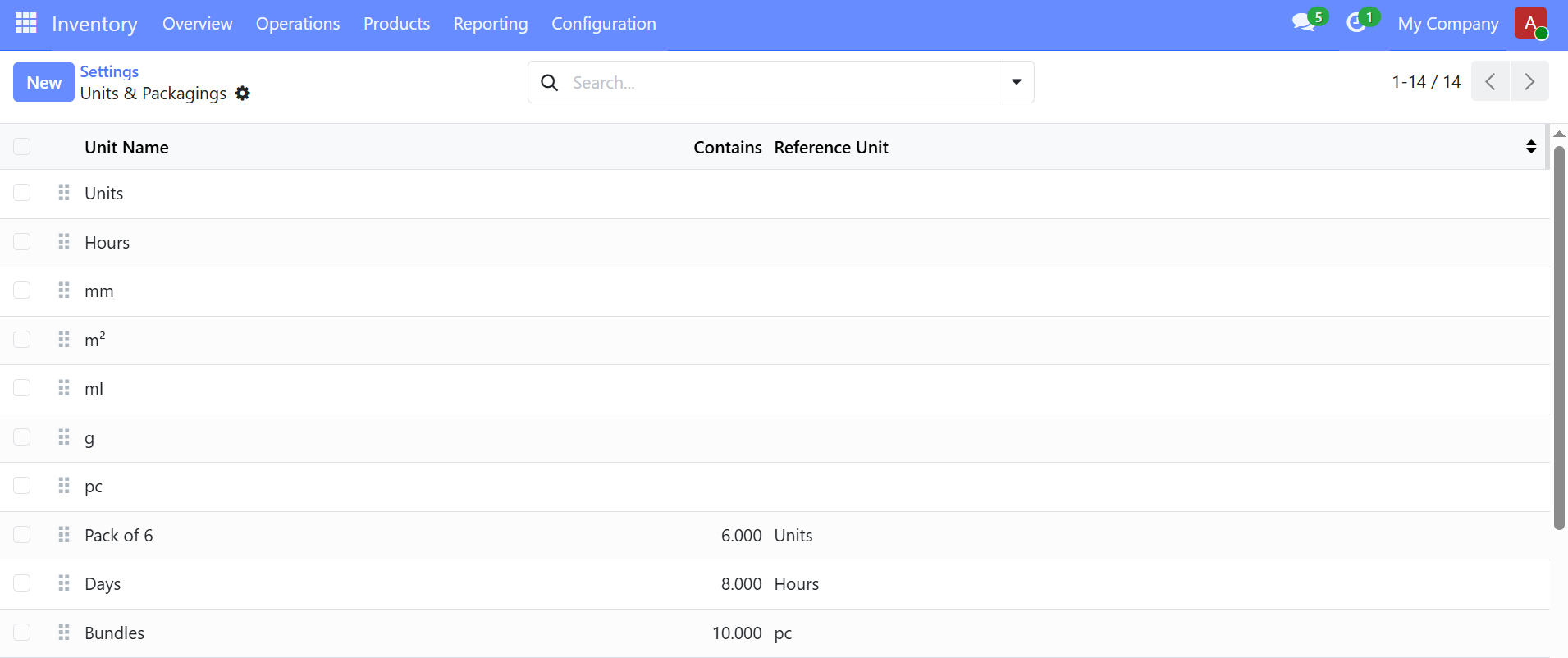
    • open Configuration -> Settings -> Units of Measure & packagings.
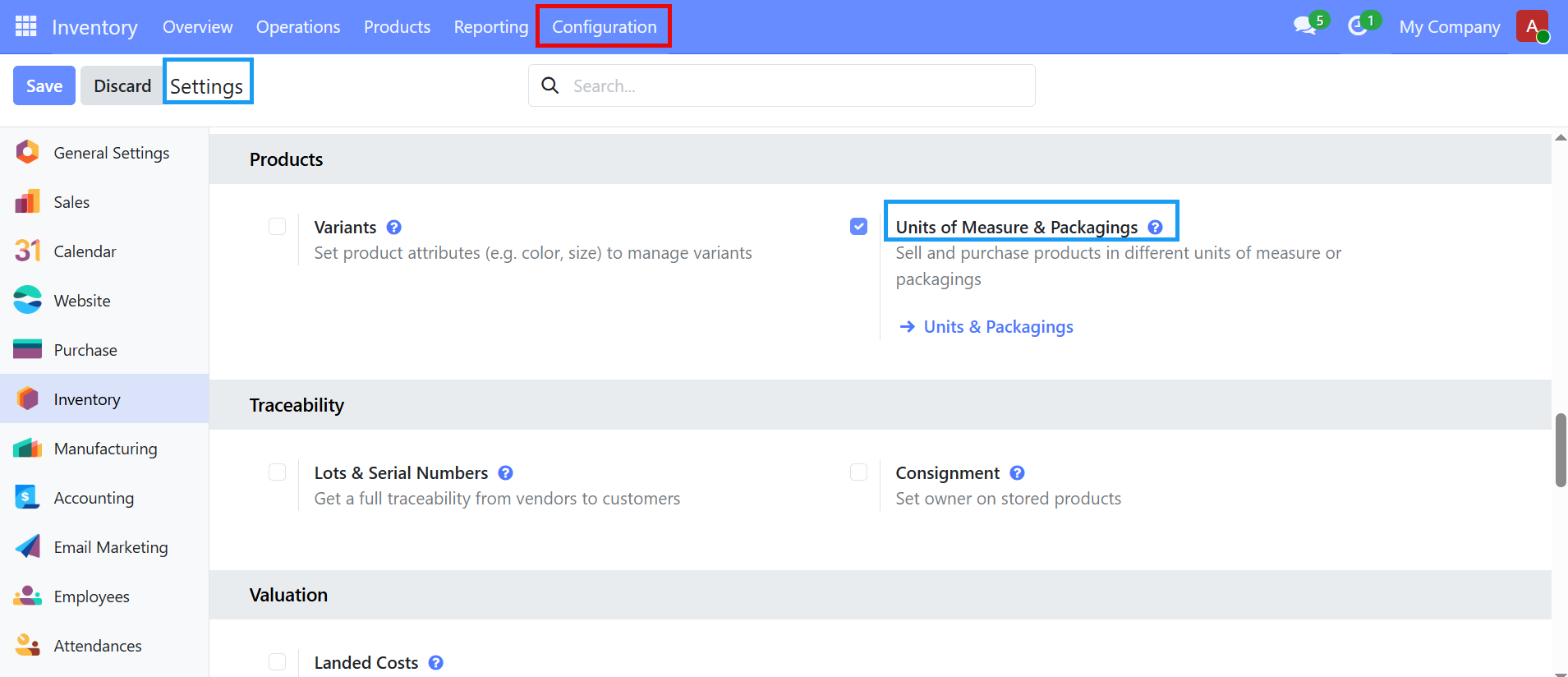
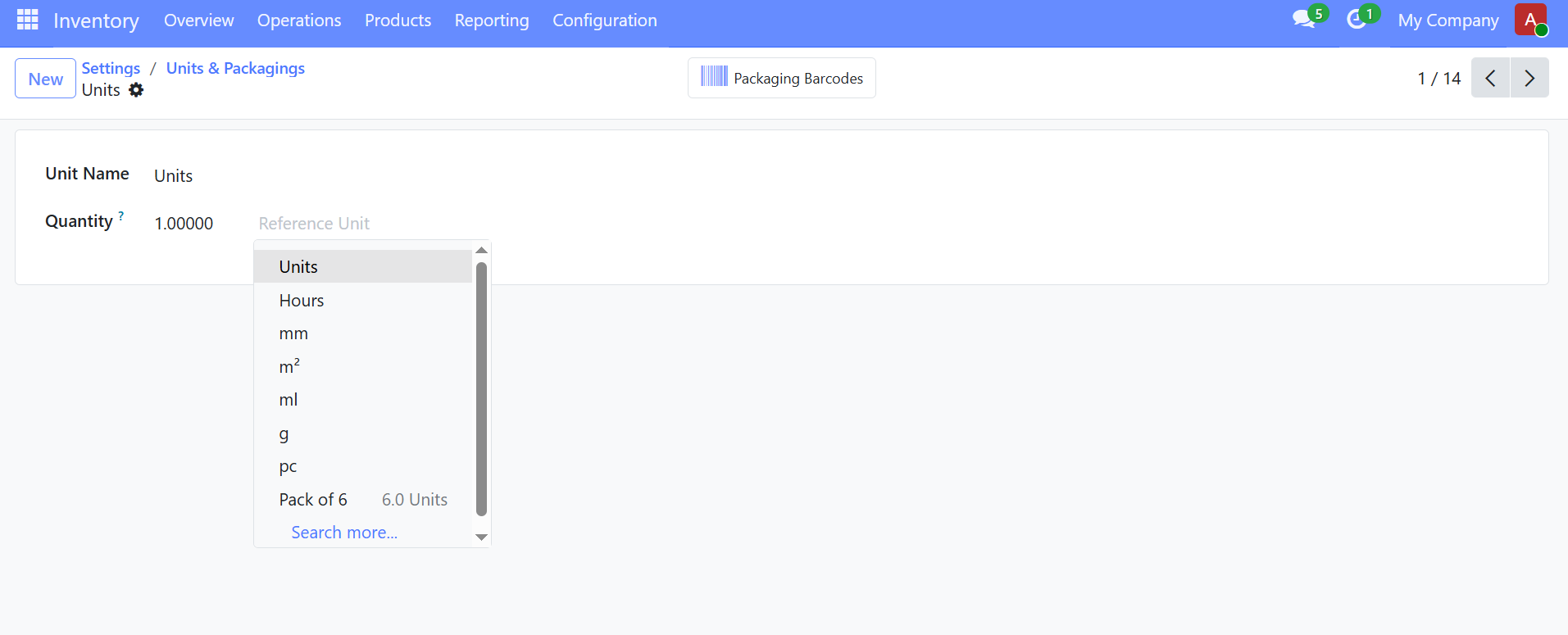
    Click Units & packagings using internal link then click New


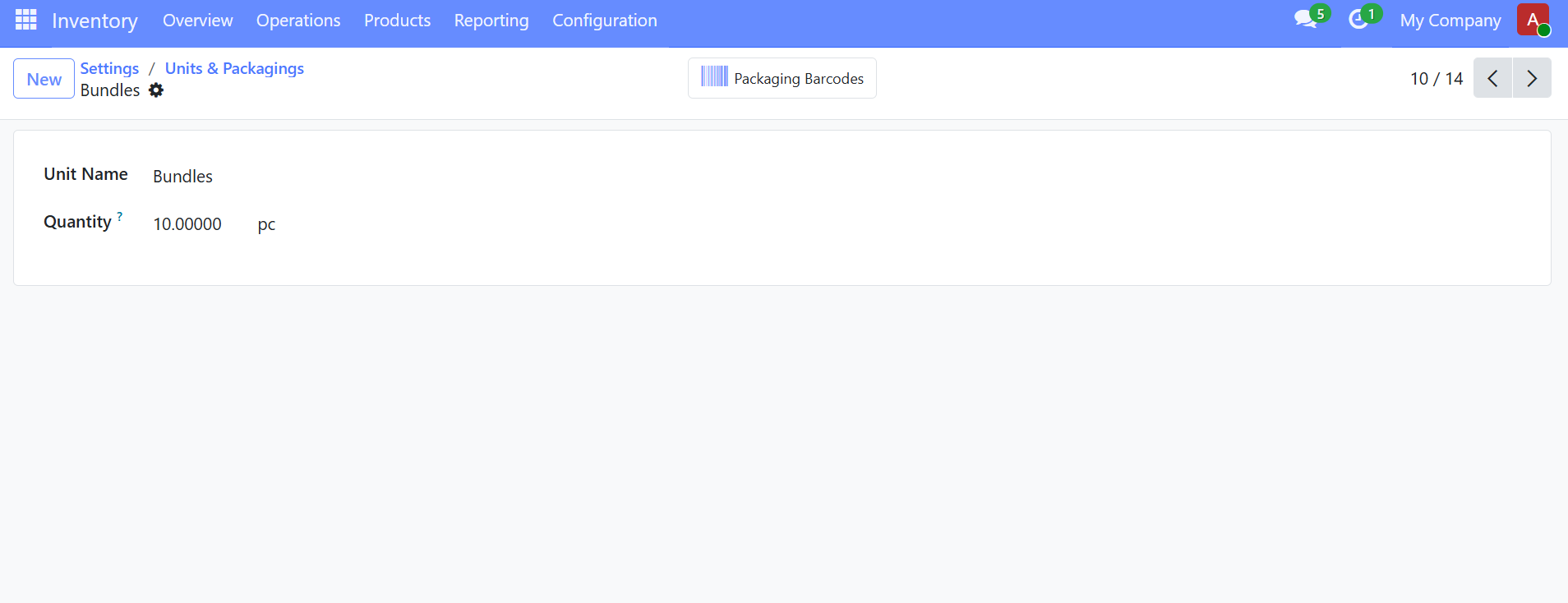
    then register the Unit that you want, if you want to convert one unit into another, register like this

    then register product using this unit.

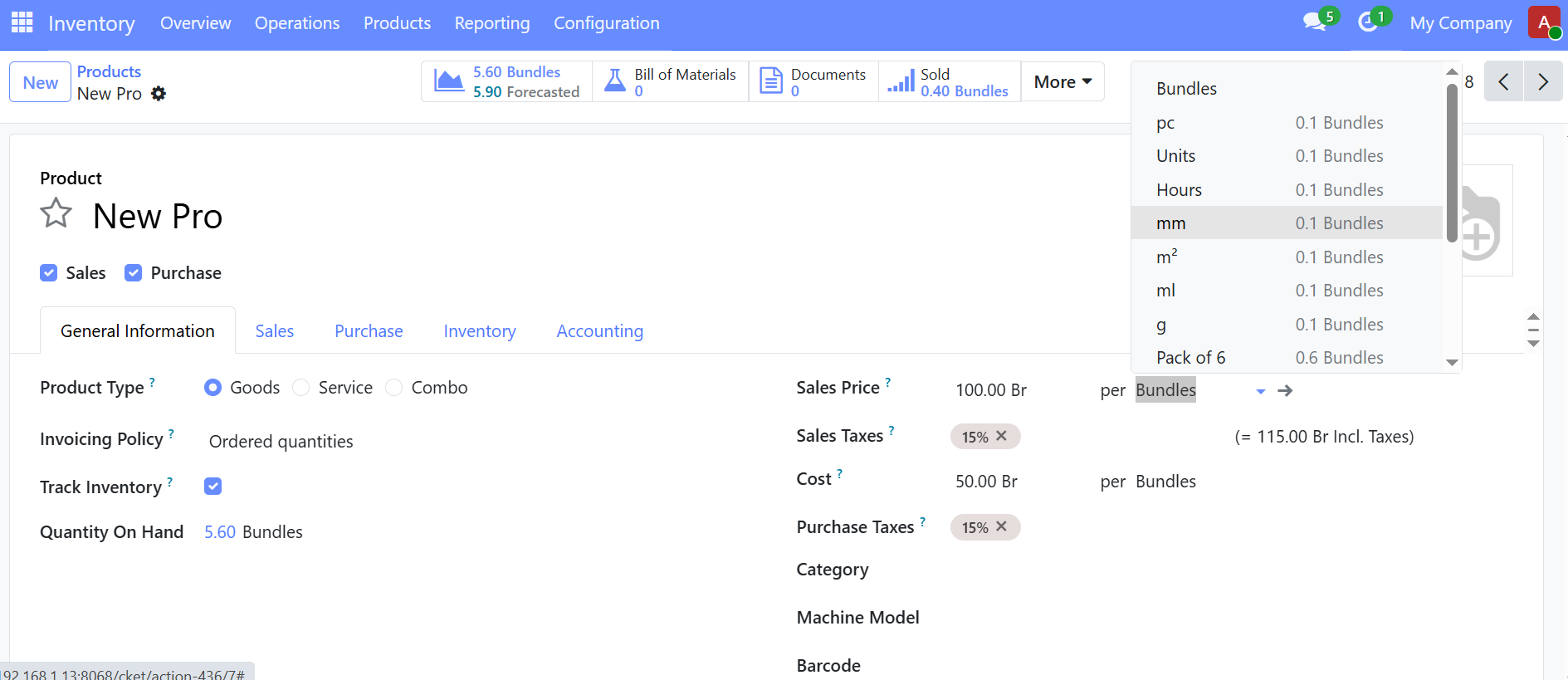
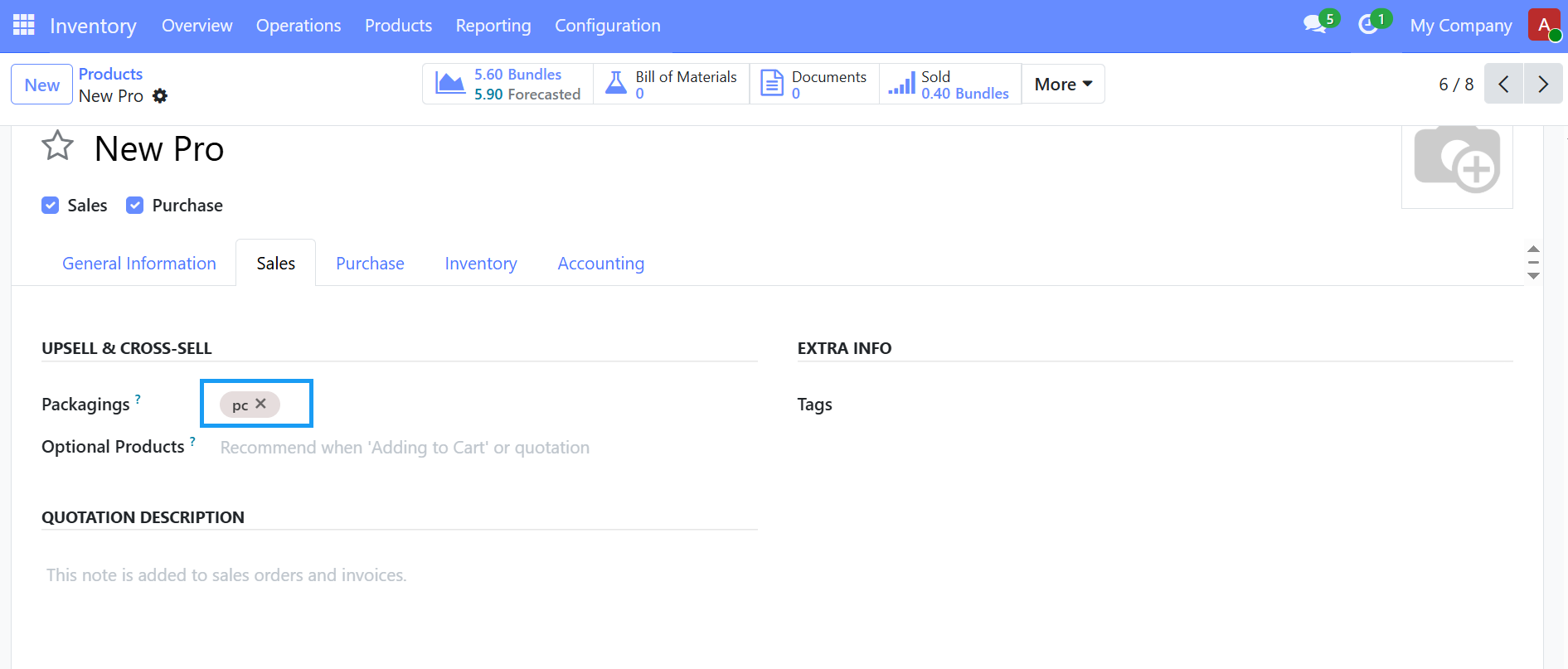
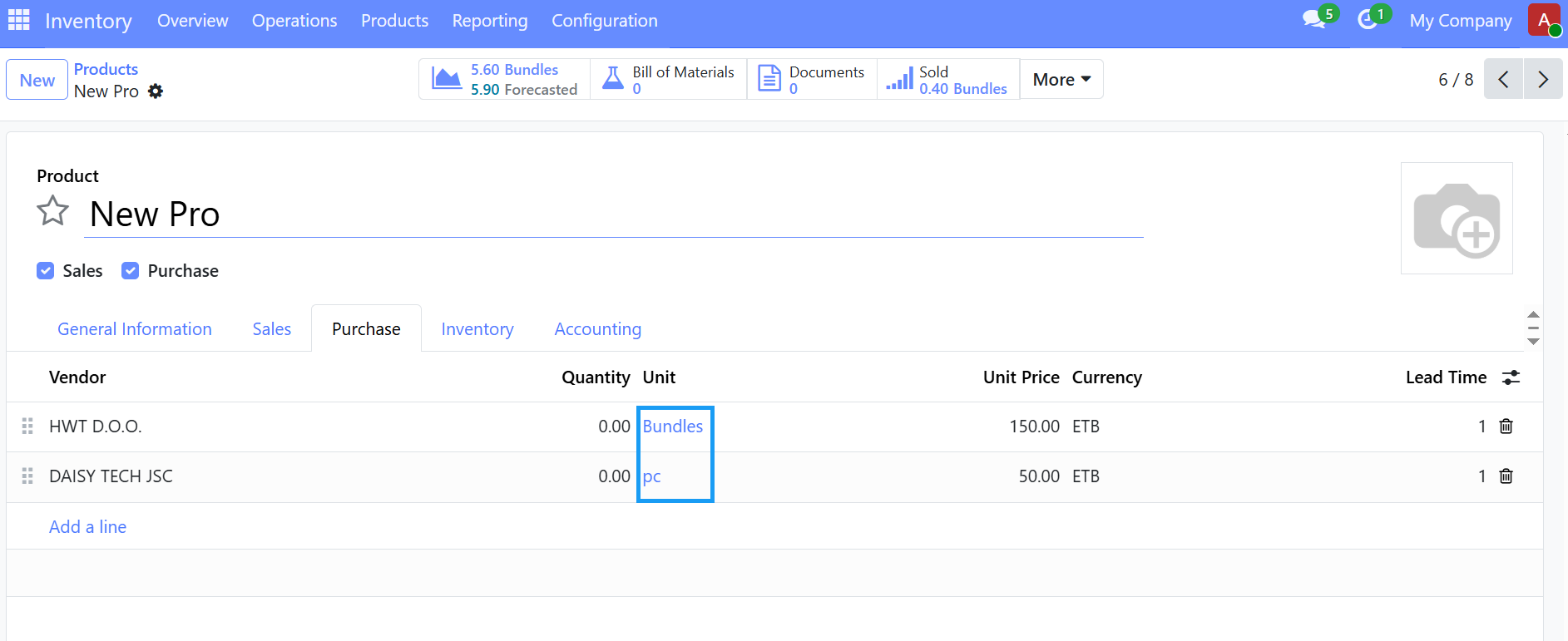
    After that on Sales and Purchase Tab configure units

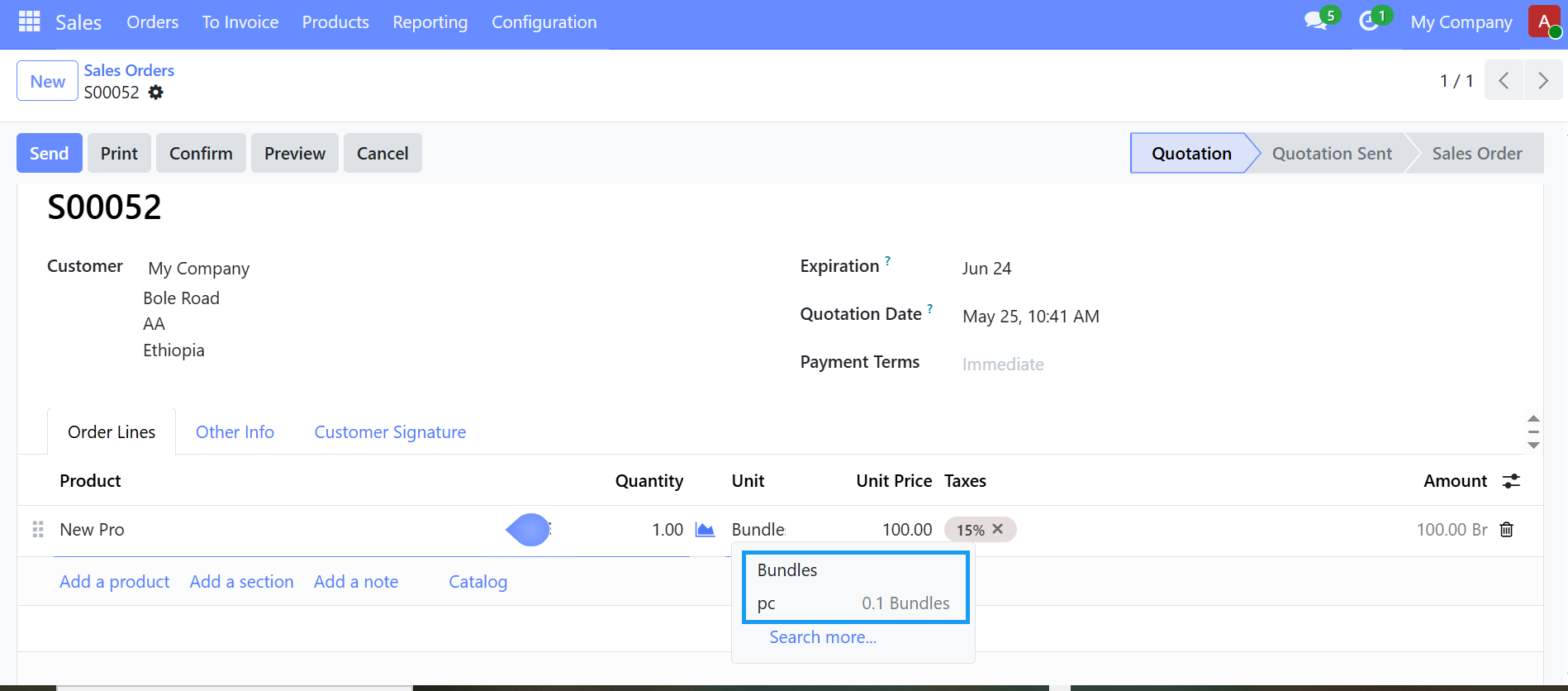
    when we go to sale this product we get two units, we can sell in Bundles or pieces(pc).


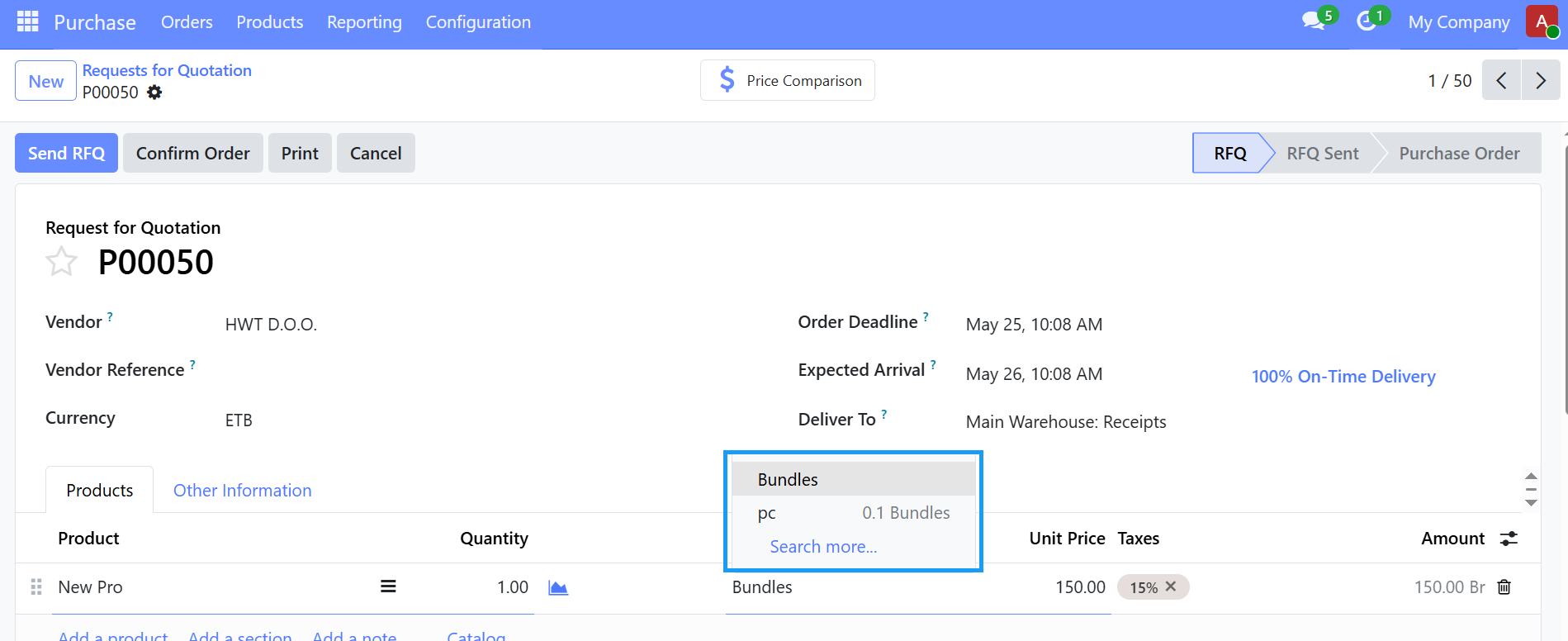
    we can purchase this product in Bundles and Pieces(pc), go to purchase app and create new purchase order.


    OPTIONAL PRODUCTS

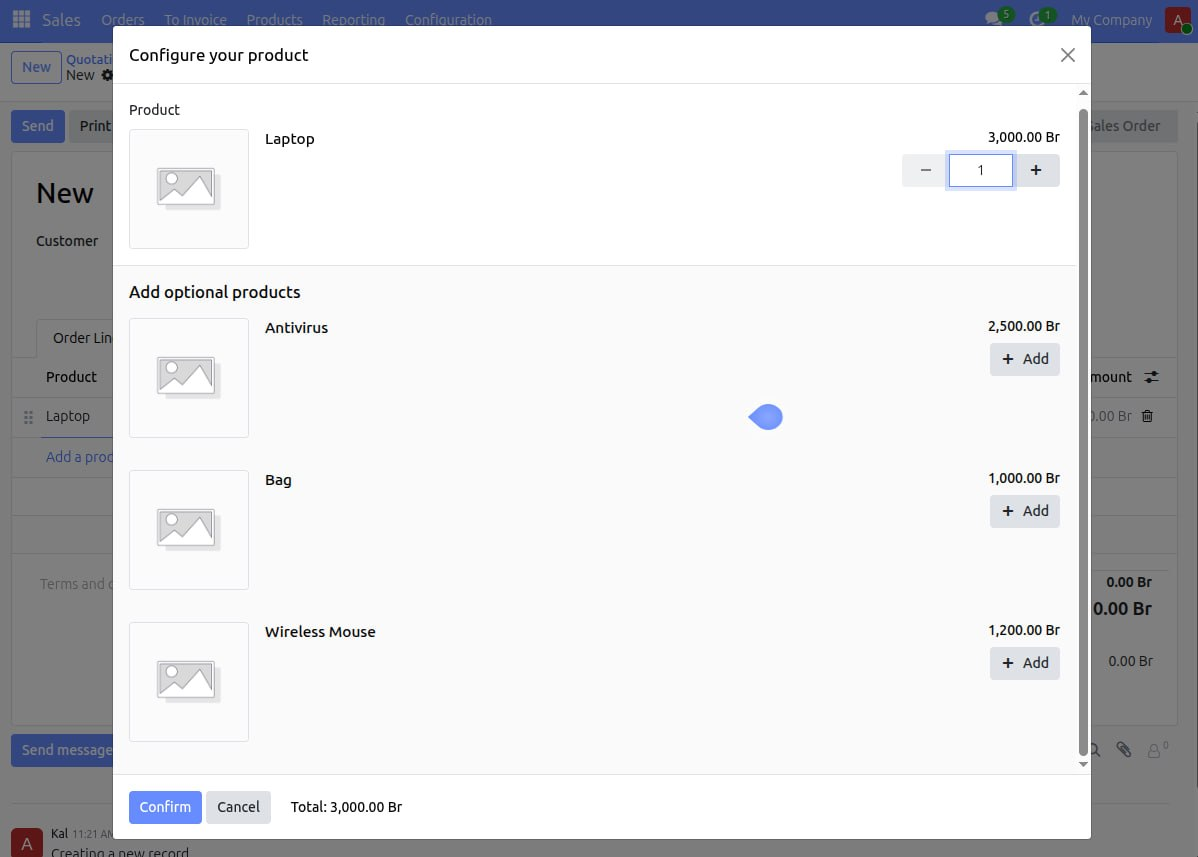
    optional products are extra items that suggests to the customer when they are buying a main product. It is mainly used for upselling or recommending related items.

    =>suppose you sell Laptop, optional products are Bag, wireless mouse and antivirus software, when the salesperson creates a quotation for the laptop, it automatically shows those optional items, the customer can choose whether to add them or not.

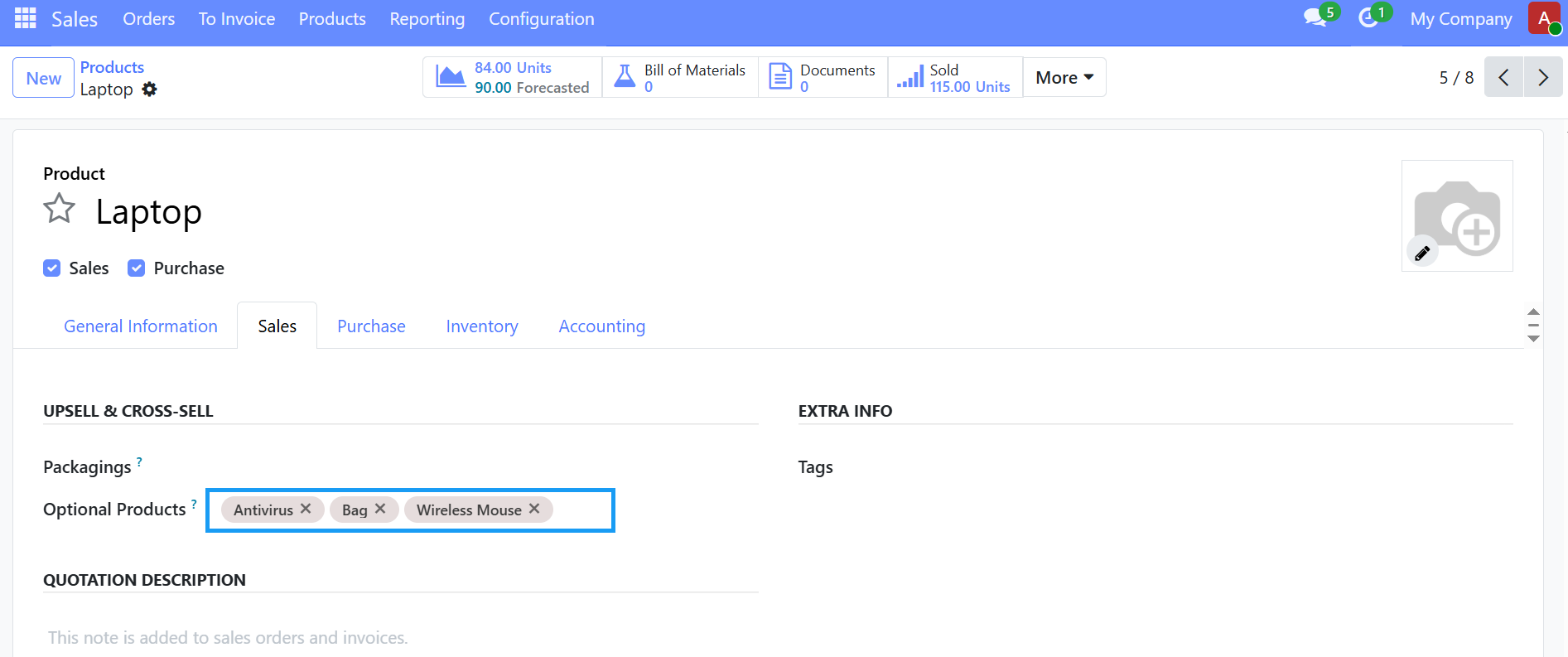
    To configure optional products, In inventory app

    • open a product
    • Go to the Sales tab
    • under optional products, add related products

    when creating a quotation, the system suggests them automatically.


    This optional products help

    • to increase sales value,
    • remind customers about related items,
    • reduce forgetting important accessories.

    REORDERING RULE

    A reordering rule is used to automatically replenish products when stock reaches a minimum level. it helps prevent stock shortages by generating replenishment requests automatically.

    Steps to create a reordering rule:

    • open the Inventory Module --> Products --> Products
    • select the product, click More - in dropdown click Reordering Rules
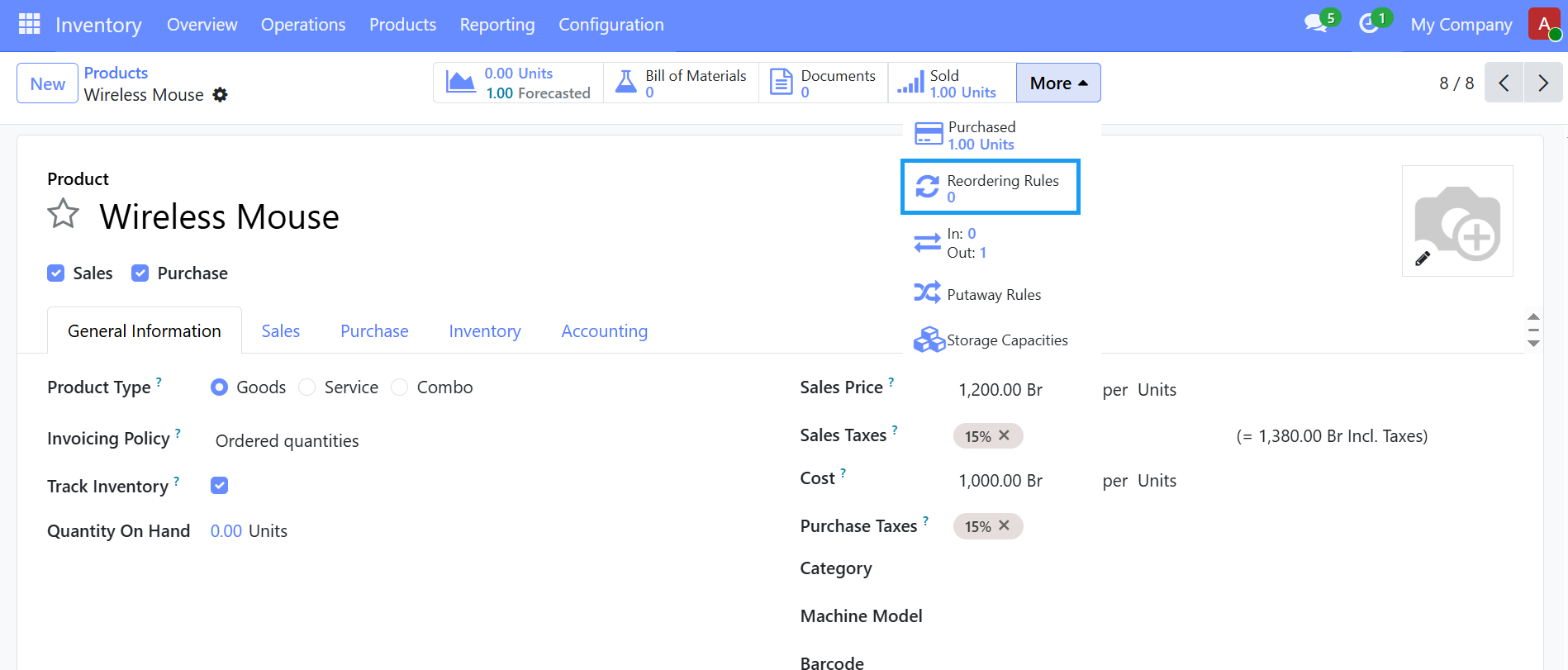
    then Click "New" and Fill the Required Fields like

    • location - the warehouse/location where stock is monitored.
    • Min Quantity - the minimum stock allowed before replenishment starts.
    • Max Quantity - the quantity you want to reach after replenishment.
    • Route - defines how the product is replenished- Buy, Manufacture, Resupply based on your configuration.
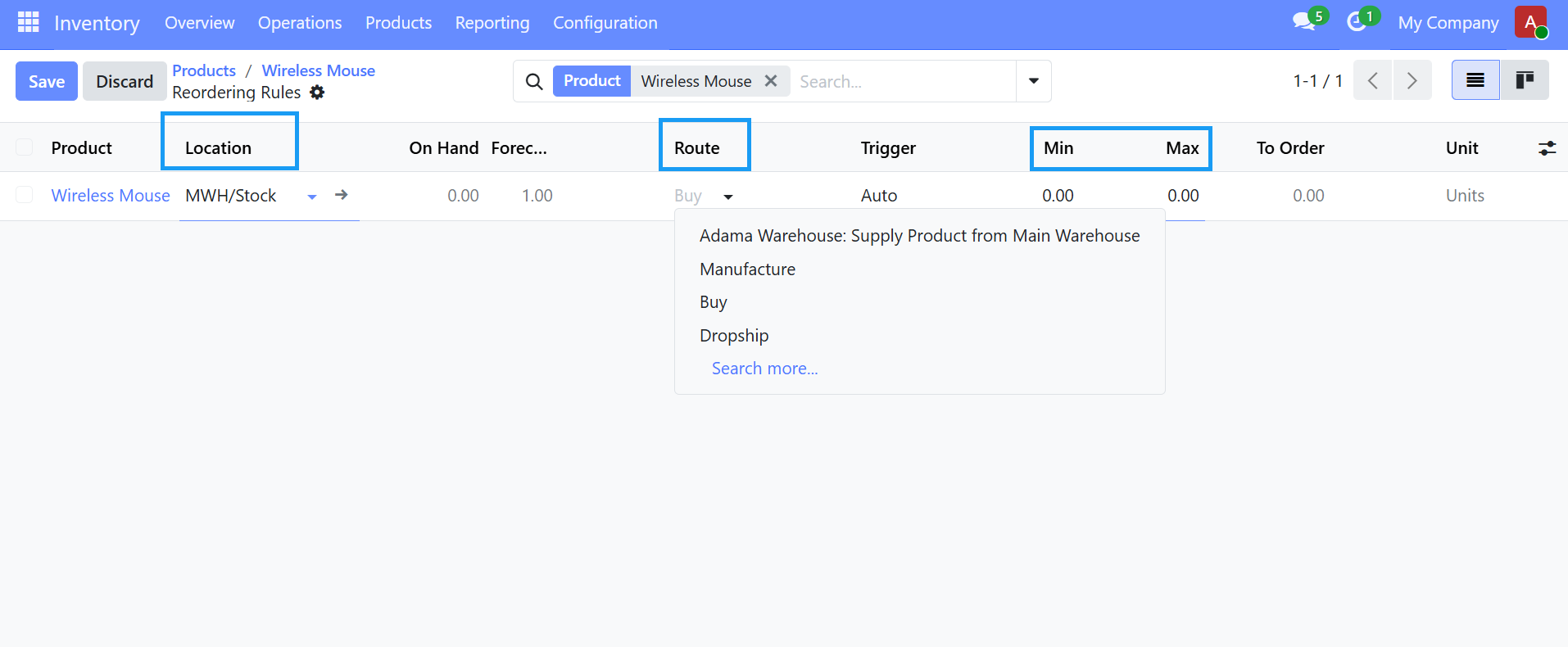
    Save the Rule, Trigger the Replenishment when stock falls below the minimum quantity. It automatically creates a draft RFQ/Purchase order if Route is Buy or creates a Manufacturing Order if the Route is Manufacture.

    Before using reordering rules, Make sure:

    • The product type is set correct usually Storable Product.
    • Vendors are configured if using the Buy route.
    • Routes are enabled in Inventory settings if need.


    Previous Next
    Follow us

    Bole Medhanialem,Abysinnia Plaza (2nd Floor)

    Addis Ababa,Ethiopia

    • +251 983 58 58 58
    • +251 94 431 0004
    • ckettech@gmail.com
    Copyright © Cket_Technologies
    Powered by Cket ERP - Create a free website